How We Keep Your Data Safe
Learn about the security measures we use to protect your photos and videos
At PixelUnion, protecting your memories is our top priority. We understand that your photos and videos are deeply personal, and we take that responsibility seriously. Here’s a detailed look at the three layers of protection we use to keep your data safe and private.
Table of Contents
Encryption
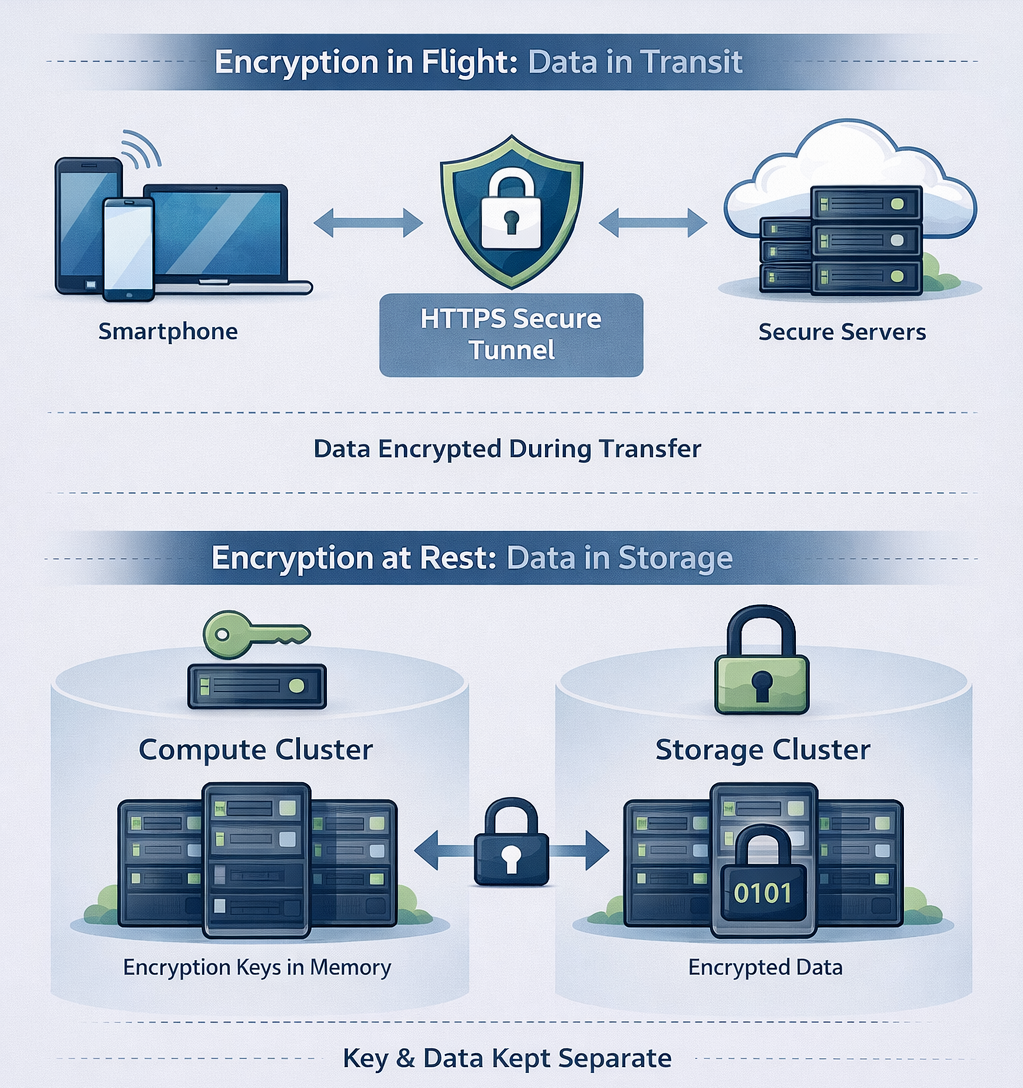
Encryption in Flight: Protecting Data on the Move
Whenever your data travels across the internet — whether you’re uploading new photos, viewing your library, or downloading memories — it’s protected by HTTPS encryption.
What is HTTPS?
HTTPS (Hypertext Transfer Protocol Secure) creates a secure, encrypted tunnel between your device and our servers. Think of it as a private courier service for your data: even if someone intercepts the package, they can’t peek inside.
How It Protects You
- All connections are encrypted: Every single request between your browser, the mobile app, and our servers uses HTTPS. There are no exceptions.
- Protection from eavesdroppers: Whether you’re on your home Wi-Fi or a coffee shop network, your photos can’t be intercepted or viewed by anyone in between.
- Verified identity: HTTPS also confirms that you’re actually talking to PixelUnion’s servers — not an impostor. Our SSL certificates are issued by trusted certificate authorities and regularly renewed.
You can always verify this yourself: look for the padlock icon in your browser’s address bar when visiting PixelUnion.
Encryption at Rest: Protecting Stored Data
Once your photos and videos arrive safely on our servers, they don’t just sit there unprotected. All data is encrypted while stored on our disks — this is called encryption at rest.
What Does This Mean?
Encryption at rest means that all data stored on our servers is scrambled using strong encryption algorithms. Without the encryption keys, the data is completely unreadable — it looks like random noise.
Think of it like a safe: the data on the disk is locked, and only someone with the right key can open it and read what’s inside.
How Our Encryption Works
We hold the encryption key, and it exists only in our cluster’s active memory (RAM) — never written to disk. Here’s why this design is so secure:
- Key lives only in memory: The decryption key is loaded into our servers’ memory when we start our systems. It’s never stored on the disks themselves.
- Power off = data locked: If a server is turned off, rebooted, or physically removed from our data center, the key disappears from memory. At that point, the data on the disks becomes completely unreadable — just encrypted noise.
- We control access: Only we can inject the encryption key when starting our systems. Without this step, even we couldn’t read the data.
Physical Separation: Key and Data Live Apart
We take this security a step further: our encryption key and your data don’t even live on the same servers.
- Separate compute and storage clusters: Our infrastructure is split into two physically separate systems — a compute cluster (where your requests are processed and the encryption key lives in memory) and a storage cluster (where your encrypted data is stored).
- Two pieces of the puzzle: To access your data, you need both the encrypted files and the decryption key. These are kept in different physical locations.
- Useless on its own: If someone were to gain access to our storage cluster — whether by shutting it down, stealing drives, or any other means — they would only have meaningless encrypted data. Without the encryption key from the compute cluster, it’s completely unreadable.
This physical separation adds yet another layer of protection. Even in a worst-case scenario where our storage infrastructure were compromised, your photos and videos would remain locked and inaccessible.
Our Storage Locations
We operate two geographically separate storage clusters:
- Primary production cluster: Hosted in Falkenstein, Germany. This is where your photos and videos are stored during normal operation.
- Backup cluster: Located in Finland. This ensures your data survives even if something catastrophic happens to our primary location.
Both clusters are fully encrypted — and critically, neither cluster has access to its own encryption keys. The keys live separately on our compute infrastructure. This means:
- Provider cannot read your data: Even though they host our primary storage, they only see encrypted blocks. They have no way to decrypt or access your files.
- Our Finnish backup provider cannot read your backups: The same applies to our backup cluster. Encrypted data, no keys.
- Physical seizure is useless: If either storage cluster were physically seized, powered down, or moved, the data would be completely unreadable without the encryption keys — which aren’t there.
This geographic redundancy protects your data from disasters, while the encryption design ensures that no hosting provider — in Germany or Finland — can ever access your memories.
Why This Matters
- Protection from physical threats: Even if someone gained physical access to our servers or storage drives, they couldn’t read your data.
- Hosting provider can’t access your files: Our infrastructure providers only see encrypted data. They have no way to view, read, or make sense of your photos and videos.
- Defense in depth: This adds another layer of protection on top of network security — so your data is safe both when moving and when sitting still.
We use industry-standard encryption (AES-256) to protect your stored data. This is the same level of encryption used by banks, governments, and security-focused organizations worldwide.
Strict Access Management: Who Can See What
Technology alone isn’t enough — we also have strict policies about who can access what within our organization.
Limited Personnel Access
Let’s be transparent: in theory, as the operators of PixelUnion, we could access your data. We hold the encryption keys, after all. But in practice, we’ve built strong policies and technical controls that prevent this from happening.
Role-Based Access Control
We use role-based access control (RBAC) to strictly limit what each team member can do:
- Developers don’t have production access: Our development team works in isolated environments. They never have access to production systems where your data lives.
- Least privilege principle: Everyone at PixelUnion only has access to what they absolutely need to do their job — nothing more. This is a security best practice known as the “principle of least privilege.”
- Tiered access levels: Different roles have different permissions. Most team members have no way to reach customer data, even if they wanted to.
Production Environment Access
- Senior personnel only: Only our most senior team members have access to production environments — and this is strictly for infrastructure maintenance and critical support operations.
- No customer data access: Even with production access, our systems are designed so that team members cannot browse, view, or access customer photos and videos. Production access is about keeping the service running, not looking at your memories.
- No casual browsing: We never look at customer accounts or photos. Your memories are yours, and we respect that boundary completely.
Defending Against Bad Actors
So far, we’ve discussed how we protect your data from internal access. But there’s another side to IT security: protecting against external threats — hackers, cybercriminals, and other bad actors who might try to break in. We follow industry best practices to defend against these threats.
Network Separation and Firewalls
Our infrastructure isn’t one big open network. We use strict network separation to isolate different parts of our system:
- Firewalled environments: Each environment (development, staging, production) is strictly firewalled from the others. Traffic can only flow through specific, approved channels.
- Network segmentation: Even within production, different services are isolated from each other. A breach in one area can’t easily spread to another.
- Minimal exposure: Only the services that absolutely need to communicate with each other can do so. Everything else is blocked by default.
This means that even if an attacker somehow gained access to one part of our system, they would hit walls everywhere they tried to go.
Web Application Firewall
Before any request even reaches our servers, it passes through a Web Application Firewall (WAF). Think of it as a security guard at the front door, checking everyone who tries to enter.
- Blocks malicious traffic: The WAF automatically detects and blocks common attack patterns — things like SQL injection, cross-site scripting (XSS), and other techniques hackers use to exploit websites.
- Rate limiting: If someone tries to flood our servers with requests (a denial-of-service attack), the WAF throttles or blocks them before they can cause problems.
- Constantly updated: Our WAF rules are regularly updated to protect against newly discovered attack methods.
This means many attacks are stopped before they even reach our application — bad actors are turned away at the door.
Responsible Disclosure: Working with Security Researchers
We believe in working with the security community, not against it. That’s why we have a responsible disclosure policy for white hat hackers and security researchers.
If someone discovers a vulnerability in our systems, we want to know about it so we can fix it — and we want to make it easy and safe for them to report it.
- Clear reporting process: Security researchers can report vulnerabilities to us through official channels.
- No legal threats: We won’t pursue legal action against researchers who report issues in good faith and follow our disclosure guidelines.
- Recognition: We appreciate the work of security researchers and acknowledge those who help us improve.
This collaborative approach helps us find and fix potential issues before bad actors can exploit them. Read our full Responsible Disclosure Policy for more details.
Protection Against Social Engineering
What is social engineering? It’s when attackers try to trick people — rather than computers — into giving up access. This might be a fake email pretending to be from IT support, a phone call from someone claiming to be a colleague, or a convincing message asking for login credentials. Social engineering attacks target human trust, not technical vulnerabilities.
We have strict policies in place to prevent these attacks:
- Security awareness training: Our team is trained to recognize phishing attempts, suspicious requests, and other manipulation tactics.
- Verification protocols: We never share credentials or sensitive access based on an email or phone call. Requests for access go through formal, verified channels.
- Skepticism by default: Our culture encourages questioning unusual requests, even if they appear to come from someone senior.
Our Promise to You
We built PixelUnion because we believe you deserve a photo storage service that truly respects your privacy. Unlike big tech companies, we don’t scan your photos for advertising purposes, we don’t train AI models on your memories, and we don’t share your data with third parties.
Your photos are encrypted, protected, and private. That’s not just a feature — it’s our founding principle.
Questions?
Have questions about our security practices? We’re always happy to explain in more detail. Reach out to us via the support page, and we’ll get back to you as soon as possible.