Backups: how we back up your data
Learn how we keep a second copy of your photos and videos in another country, and what that protects you from
Your photos and videos can’t be replaced, so we never rely on a single copy. A second, complete copy of your Library lives in a different country, ready for the day something goes wrong. Here’s how that works, and what it does and doesn’t cover.
Table of Contents
Two copies, in two countries
Everything you upload is stored in Germany. From there, it is automatically copied to a second location in Finland. Two countries, two separate copies.
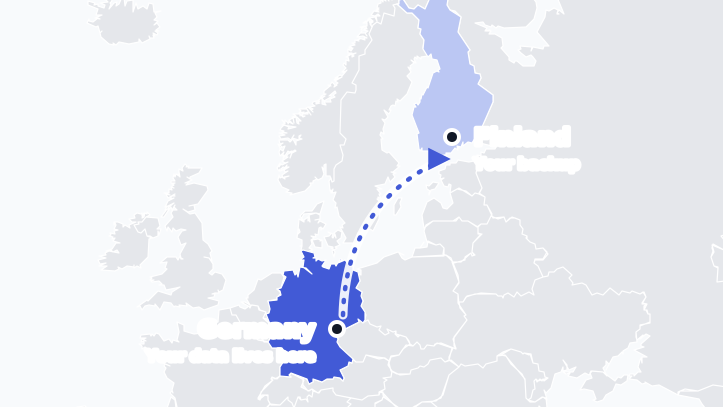
- Primary storage: Hosted in Falkenstein, Germany. This is where your photos and videos are stored during normal operation.
- Backup storage: Located in Finland. A complete second copy of your Library that nobody uses day to day. It is there for when something goes wrong.
Both locations are inside the European Union.
What the backup protects against
A backup is only worth something if it covers the ways data actually gets lost. Ours is built for these:
- Accidental deletion: Deleted the wrong album by mistake? A backup gives us something to restore from.
- Human error: People make mistakes, us included. A wrong command or a faulty change on our side doesn’t have to mean lost photos, because the backup lives apart from the system where the mistake happened.
- Hardware failure: Equipment can break. With a second copy in another place, a failure in one location doesn’t mean lost photos.
- A whole location going down: Fire, flooding, a power or network failure at a data center. Germany and Finland are far apart, so one event is very unlikely to hit both.
- Malicious attacks: Including ransomware, covered next.
Ransomware and other attacks
What is ransomware? It’s malware that scrambles your files and demands payment to unscramble them. The damage is only permanent if there’s nothing clean to go back to.
That’s what the backup is for. It sits in another country, kept separate from our primary storage, so whatever happens in Germany doesn’t automatically happen to the copy in Finland. Because we keep earlier versions of your Library, not just the latest one, we can go back to a version from before the damage.
Backups also help in a smaller version of the same story: if something encrypts or damages files on your own phone or computer and they sync to your Library, contact us as soon as you can. The sooner you tell us, the better the chances that a clean version still exists.
Your backups are encrypted too
A second copy shouldn’t be a second risk. The backup in Finland is encrypted just like your primary storage, and it has no access to its own encryption keys.
- Our Finnish backup provider cannot read your backups: They only see encrypted data, with no keys.
- Physical seizure is useless: If the backup were powered down, stolen or moved, the data would be unreadable without keys that aren’t there.
Want the full picture of how keys, access and attack protection work? Read How we keep your data private and secure.
How we follow the 3-2-1 backup rule
The 3-2-1 rule is the standard way to think about backups: keep multiple copies of your data, on separate systems, with one copy off-site. We explain why it matters in our blog post The 3-2-1 backup rule: why your self-hosted Immich needs it. Our setup follows the same idea:
- Multiple copies: Your live Library in Germany, earlier versions of it that we keep over time, and a complete copy in Finland.
- Separate systems: The backup in Finland runs on its own systems, so a problem with our primary storage doesn’t take the backup down with it.
- One copy off-site: The Finland copy is in a different country, so a fire, flood or outage at one location can’t take out both.
What a backup is not
A backup is a safety net for disasters and mistakes. It isn’t an archive, and it doesn’t replace keeping an extra copy of the things you could never replace.
If you need data restored
If you lose photos or run into a problem with your Library, contact our support team through the support page. Tell us what happened, and we’ll look into what it takes to put things right.
If the problem came from an action on your account, such as deleting photos by mistake, we’ll do our best to restore them from a backup, though we can’t guarantee a full recovery. This takes hands-on work to resolve your individual case, so we may charge a fee for the time we spend.