Finally: Leave Google Photos with a Few Clicks
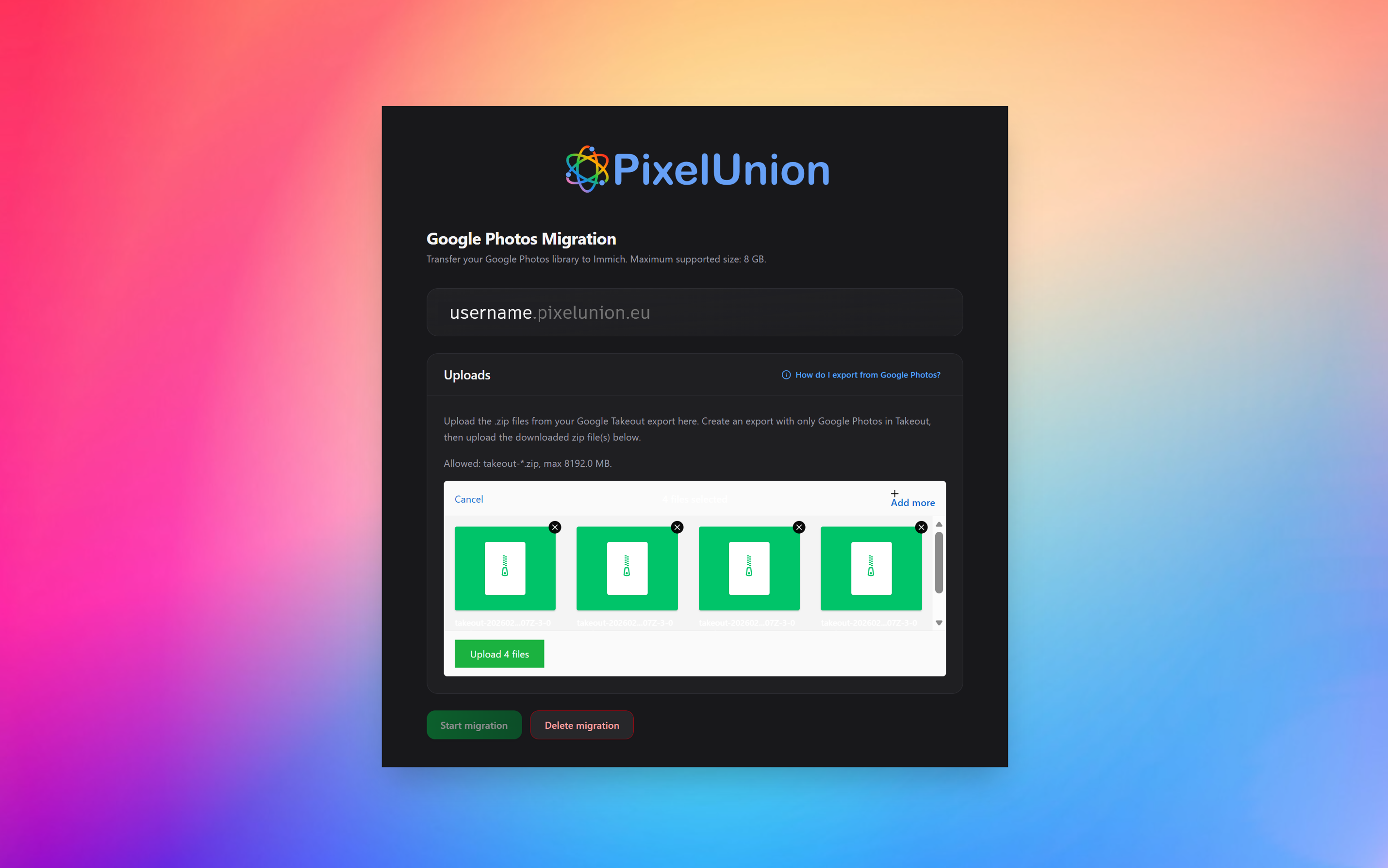
Imagine: all your precious memories, from those first baby photos to that one legendary vacation, reside on the servers of a tech giant. You pay monthly for extra storage, your data is analyzed, and you actually have no idea what happens if your account ever gets blocked. Many people want to leave Google Photos, but the technical barrier was always too high. Until today. Meet the new PixelUnion Migration Tool.
The Illusion of the “Cloud Prison”
The shiny interface of Google Photos hides a darker reality. It might seem like a convenient place for your photos, but in reality, it is a price you pay with your privacy and absolute control over your own data. The movement towards “self-hosting” and European clouds like PixelUnion is growing rapidly. People are done with being ’the product’; they want to be the boss in their own house again.
However, Google has done everything to make the barrier to leave as high as possible. Until recently, the move itself was a technical nightmare. If you have tens of thousands of photos and videos, manually downloading and re-uploading is a process that is deliberately obstructed. Metadata (like the capture date and GPS location of a photo) is often detached by Google, albums fall apart, and you end up with a giant digital mess where all your memories lose their context.
The Revolution: No More “Messing Around” in the Terminal
Previously, there was already a solution for the real techies: immich-go. A powerful tool that could read and upload your Google export via the command line (those notorious black text screens). For the average user, however, this was advanced rocket science. One wrong command, a missing ‘dependency’, or an incorrect path and it didn’t work. Moreover, your own computer had to be on for days to process and send the data.
At PixelUnion, we thought: that has to change. Why wouldn’t we put that powerful technology behind a simple and beautiful dashboard?
That is exactly what our new migration tool does. It uses the robust engine of immich-go, but you only see a clear interface in your browser. You enter your domain, paste your API key, and you can start. No terminal, no scripts, no headaches. It is truly a must-have for anyone who seriously wants to move away from Google.
How We Do the Heavy Lifting for You
Unique to the PixelUnion approach is that we move the process from your computer to our servers. As soon as you upload your Google Takeout files to our portal, our powerful servers take over.
What happens in the background?
- Metadata Recovery: Google often splits the information of your photos (like the GPS location and the date) into separate JSON files. Our tool automatically links these back to the correct photo.
- Album Preservation: Have you worked for years on that one folder “Vacation 2018”? Our tool recognizes these structures in the Takeout export and rebuilds them in your PixelUnion environment.
- Deduplication: We ensure that we handle duplicate files smartly, so your storage is used optimally.
The Roadmap: Your Way to Digital Freedom
Want to get started right away? The process is now reduced to four clear steps:
Step 1: Packing Your Bags (Google Takeout)
Go to Google Takeout. This is the official way to request your data from Google. Click on “Deselect all” and check only Google Photos.
- Important Tip: In the export settings, choose the file type .zip and a file size of 8 GB. This is the current maximum that our migration tool optimally supports.
- Google will now get to work for you. For large libraries, this can take a few hours to even a day. You will receive an email with a download link as soon as your ‘bags’ are ready. Download the files, but do not unzip them! Our tool uses the zip files directly.
Step 2: The Digital Key to Your New House
Log in to your own PixelUnion site (e.g., yourname.pixelunion.eu). Open your profile at the top right, go to Account Settings, and click on API Key. Create a new key and copy it.
- Safety First: We take privacy seriously. After a successful migration, we delete your API key and all temporarily uploaded content directly from our servers.
Step 3: Let the Portal Do the Work
Open the PixelUnion Google Photos Migrator. Here you only need to fill in your environment name (your subdomain) and the API key from the previous step. Then drag your downloaded Google Takeout zips into the window.
- Note: During the upload, you must keep your browser open and your computer on. As soon as the progress bar is finished and the status jumps to “queued” or “processing”, our servers do the rest.
Step 4: Wait Until the Migration is Complete
We perform the actual migration on our own servers. This may take a while — count on hours for really large libraries. You will slowly see your photos and videos appear in your PixelUnion environment.
Give the system some time afterwards as well. In the background, thumbnails are being created, faces recognized, and objects indexed. This process continues after the migration status says “completed”.
Why This is a ‘Must-Have’
With this tool, we remove the last barrier to truly becoming the owner of your own data. It is no longer a project you have to set aside a whole weekend for or for which you need an IT degree. It is now truly for everyone: from the hobby photographer to the family manager who wants to safely house all memories.
Join the Open Beta
Because we are continuously improving the tool, it is currently available in open beta. We already have countless successful migrations behind us, but we would love to hear your experience. Did you run into something or do you have a suggestion to make the process even easier? Our support team is ready.
Are you ready to say goodbye to Google Photos for good? Visit our migration page for all details and start ‘bringing home’ your photos today. Your memories belong to you, not to an algorithm.
Need help during the process? Contact us via our support page with a screenshot of your migration ID, and we’ll look into it with you right away!