Immich Gallery: a native Mac app for your Immich photo library
If you use Immich on a Mac, you know the drill. Your phone has a proper app, but on the desktop your photo library lives in a browser tab. It works fine. It never feels like it belongs on your Mac.
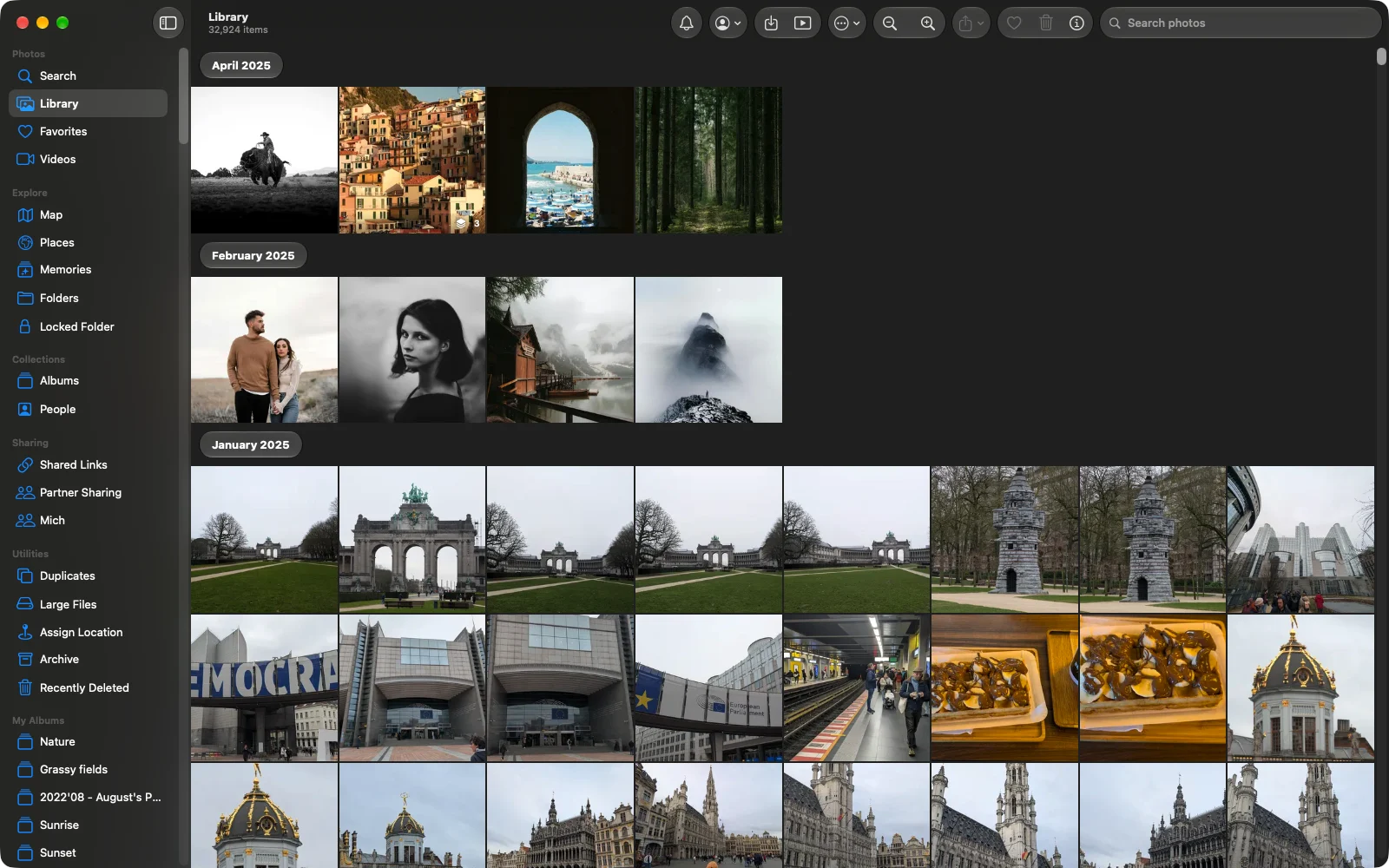
That is the problem Immich Gallery sets out to fix. It is a new, independent open-source macOS app for Immich, written from scratch in SwiftUI, with an interface that will feel very familiar if you have ever opened Apple Photos. And because PixelUnion runs on Immich, it works with your PixelUnion library too.
What Immich Gallery does
The app gives you a sidebar, a real toolbar, keyboard shortcuts, multiple windows and tabs, and native full screen. You can press Space to open a photo in Quick Look, drag photos from the Finder into an album, drag them back out to your desktop, and send them anywhere through the macOS share sheet. There are even Shortcuts actions, so you can build small automations around your library.
The feature list is longer than I expected for a first release:
- A timeline grouped by month, with blurred placeholders while thumbnails load
- A photo viewer with zoom, video, Live Photos, slideshows and an info panel showing camera, exposure, location and people
- Albums you can create, edit, sort and share, including comments and likes
- People: rename, merge, hide and assign faces
- Smart search (describe what is in the photo), plus search by file name, description and text inside images
- A world map with photo clusters, places and memories
- Uploads of files and whole folders, with duplicate detection
- Downloads of originals, or a selection or album as a ZIP
- Editing of date, time zone, location, description and rating, plus non-destructive rotate and crop
- Favorites, archive, tags, folders, the Locked Folder, and support for several accounts and servers
On privacy, the developer is clear. The app talks only to the servers you sign in to. There is no analytics, no tracking and no third-party service. Your credentials are stored in the macOS Keychain. That is exactly how a photo app should behave.
It is not finished, and it says so. There is no automatic background backup, no offline library, and no support for 360° photos yet. The README calls it an early preview and warns that it can edit, move and delete photos on your server, so expect rough edges. Immich Gallery is also not affiliated with the Immich project or with PixelUnion. It is one developer’s side project, released under the MIT license.
How to connect Immich Gallery to PixelUnion
You need macOS 15 Sequoia or later. The app runs natively on both Apple silicon and Intel Macs. It is signed and notarized by Apple, so it opens without any security warnings.
PixelUnion accounts sign in through our own login page, which the app does not support directly. That is why you connect with an API key instead of your password. It takes about two minutes.
- Download the latest
.dmgfrom the Immich Gallery releases page and drag the app to your Applications folder. - Open your PixelUnion library in the browser and go to Account Settings → API Keys.
- Click New API Key, give it a name like “Immich Gallery on my Mac”, and copy the key. You will only see it once.
- Open Immich Gallery and enter your server address, for example
https://yourname.pixelunion.eu. - Choose to sign in with an API key and paste the key.
Your timeline should load right away. If you ever stop using the app, delete the API key in the same settings screen and the app loses access.
Want to look around before connecting your own photos? The app also works with Immich’s public demo server at https://demo.immich.app (email demo@immich.app, password demo).
A tip for this early stage: use the app for browsing, searching and organizing first, and be a little careful with bulk deletes and edits until it matures. PixelUnion backs up your data, but nobody likes restoring photos they deleted by accident. For more background on which third-party tools work with PixelUnion, see External libraries and third-party tools.
Why this matters to us
One of the best parts of building on open source is that we do not have to build everything ourselves. Immich has a large community, and projects like Immich Gallery show it. Someone wanted a better Mac experience, built it, and shared it with everyone for free.
That is a real advantage over the closed platforms. With Google Photos or iCloud, you get the apps those companies decide to make, and nothing else. With Immich, and with PixelUnion, your photos are reachable through an open API. You can pick the app that suits you, switch whenever you like, and keep full control over where your photos live. In our case that is on European servers running on renewable energy.
If you try Immich Gallery, the developer welcomes bug reports, ideas and translations on GitHub. And if you like what the Immich project makes possible, consider supporting Immich too.
Not on PixelUnion yet? You can try it with your own photos and connect any Immich app you like, including this one.