The AI inside your photo library, and why we moved it onto our own GPUs
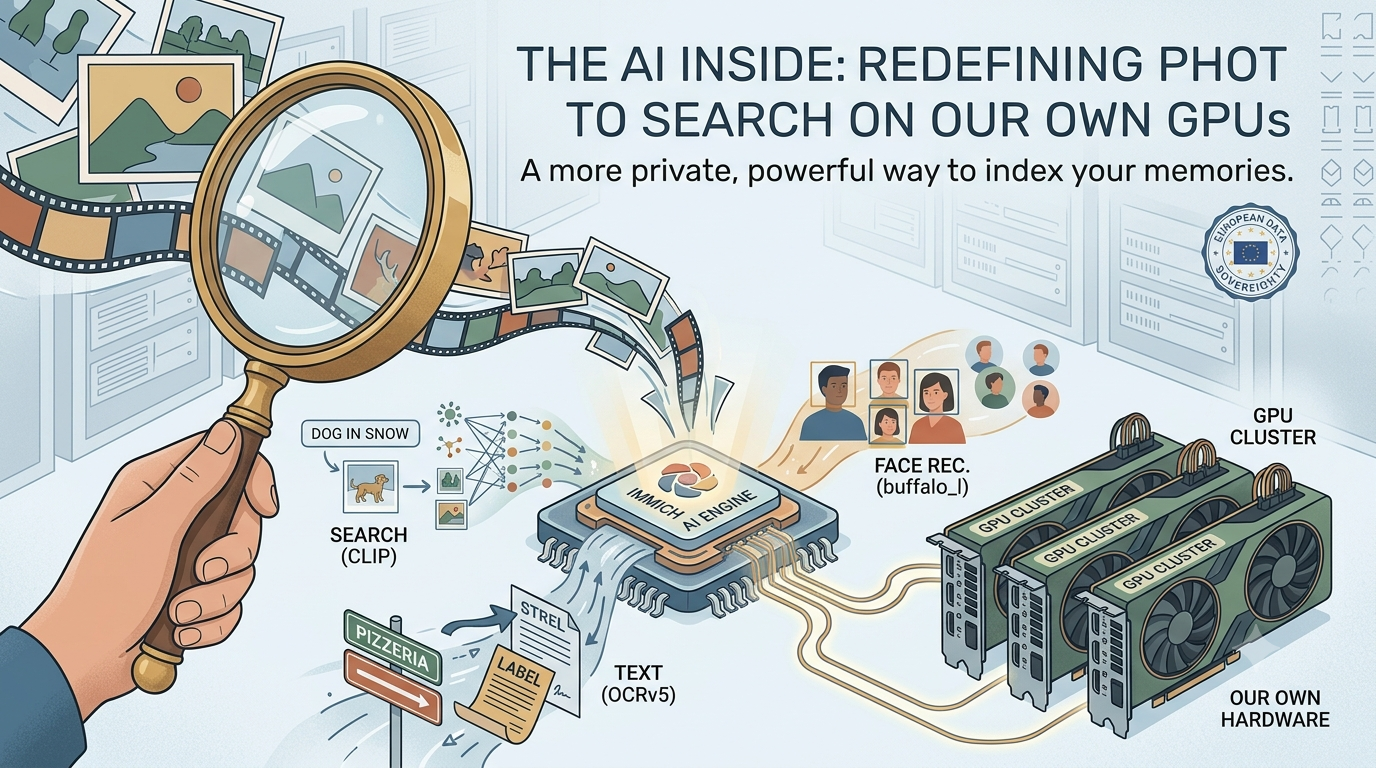
When you search your photo library for “dog in the snow” and the right picture comes up, something has already read that photo for you. No one tagged it. A machine learning model looked at the pixels, decided what was in the frame, and stored that understanding so you could find it later. We recently moved that work from CPUs onto our own GPUs (graphics processing units). This post explains what the AI actually does, and why the hardware underneath it matters.
The models that make this work are not ours. They come from the open-source Immich project that PixelUnion is built on. What is ours is where they run: on hardware we own and operate, on European soil, not in a third-party AI cloud. The models read your photos, and we think it matters that they do it in our own racks and nowhere else.
There is one distinction worth making before we go further, because it is the one that matters most for your privacy. Using a model is not the same as training one. Training is the expensive, one-time process where a model learns from millions of example images, and it is done by the model’s authors long before it ever reaches us. What we do is inference: we take a finished, already-trained model and run your photo through it once to get a result, the way you run a document through a scanner. Your photos are never used to teach the models anything. They are not added to a training set, they do not improve a shared model, and nothing about them leaves to make some future version smarter. The model looks at your photo, produces its answer, and forgets it.
Three jobs, one shared trick: making pixels searchable
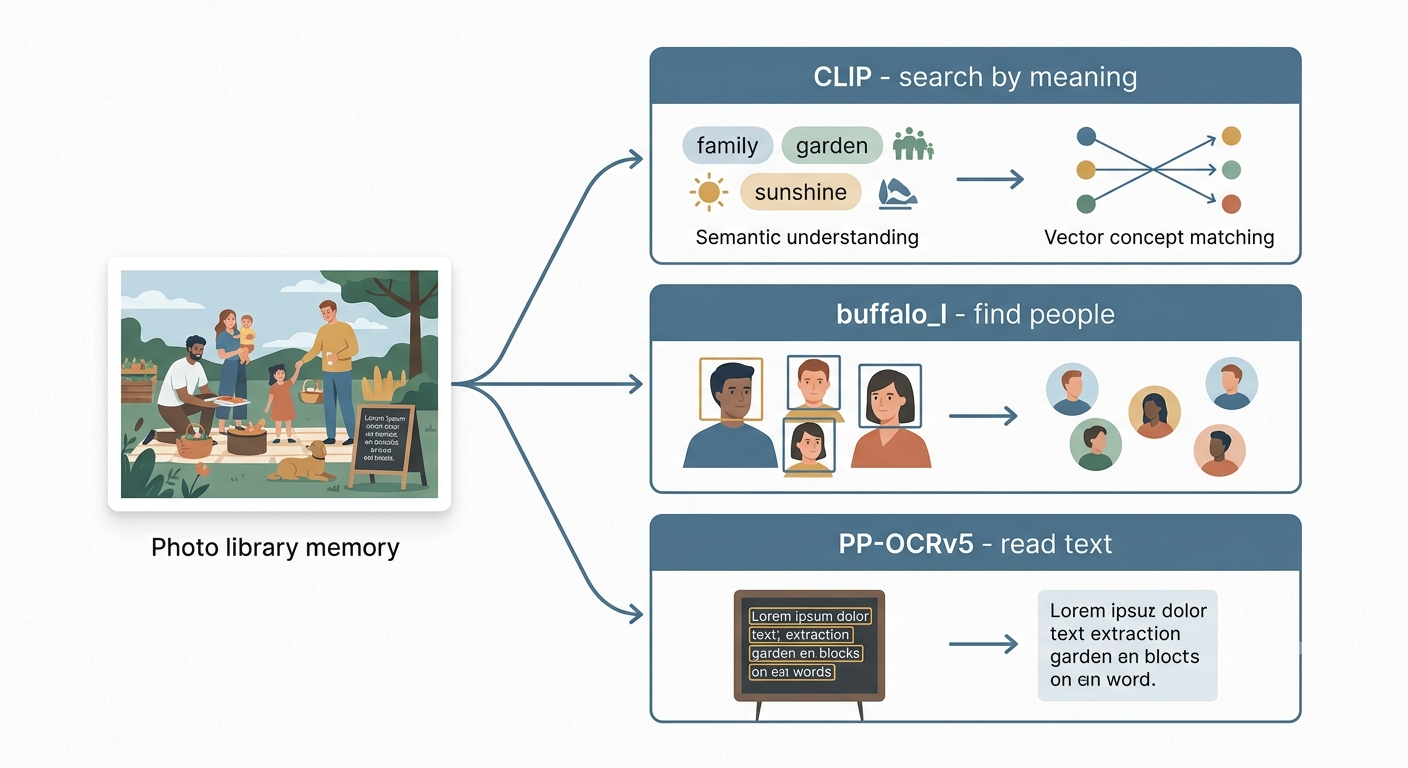
Immich runs its AI in a separate service, the immich-machine-learning container, documented in the project’s machine learning README. It does three jobs, and each one solves a different problem:
- Smart search turns a photo into something you can search with plain language, using a CLIP model.
- Face recognition finds faces and works out which ones belong to the same person, using a model pack such as
buffalo_l. - OCR reads text that appears inside your photos, using a
PP-OCRv5model.
It is worth being precise here, because “three models” is a simplification. Two of these jobs are actually a pair of models working in sequence, and every job can be swapped for a different model. Face recognition runs a detection model followed by a recognition model, and buffalo_l is a bundle that contains both. Immich also ships alternatives like antelopev2, buffalo_m, and buffalo_s. OCR works the same way, one model to find text and another to read it. And CLIP itself is a pair of encoders, one for images and one for text, with many interchangeable variants. There is no separate object detection model at all: recognizing that a photo contains a dog or a beach is handled by CLIP, not by a dedicated tagging model.
What matters for understanding them is that all three jobs share one underlying trick, so it is worth understanding that trick first. Then the differences make sense.
CLIP: searching by meaning, not by tags
Old photo search worked on filenames and manual tags. If you did not type “beach” into a caption, searching “beach” found nothing. CLIP, a model originally published by OpenAI (paper here), removes that limitation. It looks at the actual content of an image.
Here is the part that trips people up, explained plainly. CLIP does not store a list of words for each photo. It converts every photo into a vector: a long list of numbers, a few hundred of them, that together describe the meaning of the image. A picture of a husky in fresh snow and a picture of a different dog in snow end up with similar lists of numbers, because they mean similar things. That list is called an embedding.
What vector search actually is
Once every photo in your Library is a vector, we store all those vectors in a database. Searching works like this:
- You type “dog in the snow”.
- The same model turns your words into a vector, using the same number system as the photos.
- The database compares your query vector against the stored photo vectors and measures how close each one is.
- The closest matches come back first.
“Close” here is math. Each vector is a point in space, and the system measures the distance between your query and every photo. In the simplest form this is brute force: check the distance to every single photo, sort by whichever sits nearest. There is no tag matching and no keyword lookup anywhere in that process. A photo with no caption, no filename, and no description will still surface, because its meaning lives in the numbers.
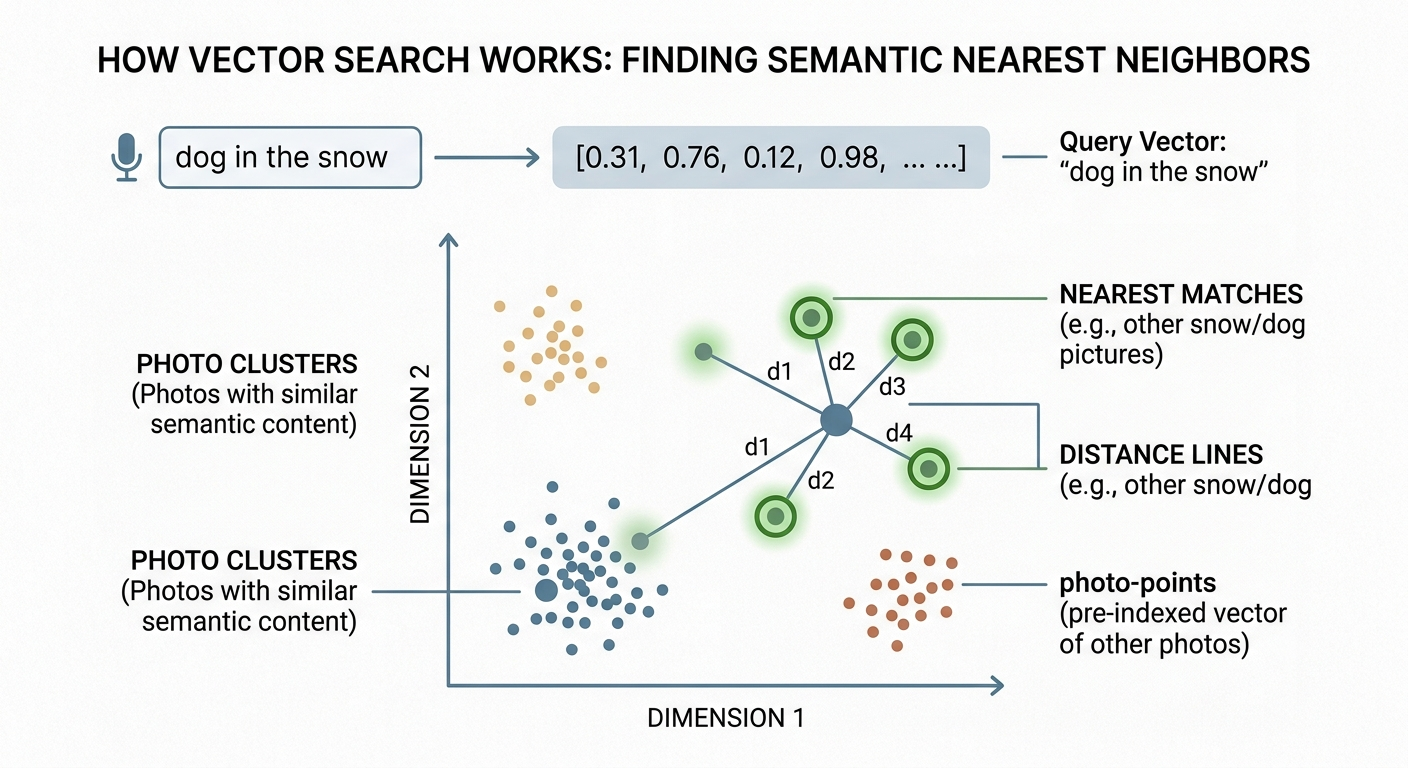
That brute-force comparison is the honest version, and it works fine for a normal library. It also names the cost. Comparing one query against millions of vectors, one at a time, gets slow. At scale you switch to smarter indexes, approximate nearest neighbor search, that skip most of the comparisons and still find the right matches. It depends on library size which approach you need, but the principle is the same: turn everything into vectors, then find the nearest ones.
One more thing that matters in Europe. The default CLIP model handles English well and other languages poorly. There are multilingual variants, and Immich lets you swap them in, as its model selection guide describes. The tradeoff is real: the better multilingual models are larger and need more memory to run. That memory pressure is one reason the choice of hardware starts to matter, which we will get to.
buffalo_l: finding the same person across your photos
Face recognition in Immich uses buffalo_l, a model pack from the InsightFace project, hosted for Immich on Hugging Face. It runs in two stages, and both are worth understanding because people often assume it does something it does not.
Stage one is detection. The model scans the image and works out where the faces are. Think of the focus square a camera draws around a face, except the model does it after the fact, on every photo. The output is a set of boxes: here is a face, here is another one.
Stage two is recognition. For each face it found, the model produces a vector, the same idea as CLIP but tuned for faces. You can think of it as a numerical fingerprint of that face. Two photos of the same person, in different light and from different angles, produce vectors that sit close together. Two different people sit far apart.
That is the whole mechanism behind “people” in your Library. We do not look your face up against any external database, and there is no name attached to anything until you choose to label a person yourself. The model measures the geometry of a face and turns it into numbers, then groups the numbers that are close. Immich’s own guide on facial clusters describes how that grouping can be tuned. The fingerprints stay in our system, on our hardware. They are never the product.
PP-OCRv5: reading the text inside your pictures
The newest of the three is OCR, optical character recognition, added in Immich version 2.2. It uses PP-OCRv5, a model from Baidu’s PaddleOCR project. OCR is what lets you search for words that appear inside a photo: a street sign, a shop front, a whiteboard, the label on a bottle.
It also works in two stages, and the split mirrors face recognition.
First it detects text. The model finds the regions of the image that contain writing and draws boxes around them, the same way the face model boxes faces. A photo of a street might have text in five places: a sign, a number plate, a poster, a menu, a bus. Each becomes a box.
Then it reads. For every box, a second model works out which characters are actually there and turns them into real, machine-readable text. That text goes into the search index, so later you can search “pizzeria” and find the photo of the restaurant front, even though you never typed a caption.
The tradeoff is one Marc-ish detail worth stating: OCR is good at clear printed text in supported scripts, and it is much weaker on handwriting or heavily stylized fonts. Immich officially supports English, Chinese, and Japanese, with Latin-script languages generally working at somewhat lower accuracy, as discussed in the project’s OCR language thread. It is a genuinely useful feature, not a magic one.
Why all of this runs so much better on a GPU
Every model above does the same kind of arithmetic underneath: enormous numbers of small multiplications and additions, arranged as matrix math. Turning one photo into a vector is millions of these operations. That single fact explains the whole hardware story.
A CPU has a small number of very capable cores, a handful to a couple of dozen. Each core is flexible and fast, and it works through tasks largely in sequence. That design is excellent for the varied, branching work a server does all day. It is a poor fit for doing the same simple multiplication a few million times in a row.
A GPU is the opposite. It has thousands of simpler cores built to run the same operation across huge batches of numbers at once, in parallel. Graphics cards were designed to shade millions of pixels simultaneously, and it turns out that machine learning inference is the same shape of problem: the same math, repeated across a lot of data. So instead of a photo’s millions of operations trickling through a few CPU cores one wave at a time, they spread across thousands of GPU cores together.
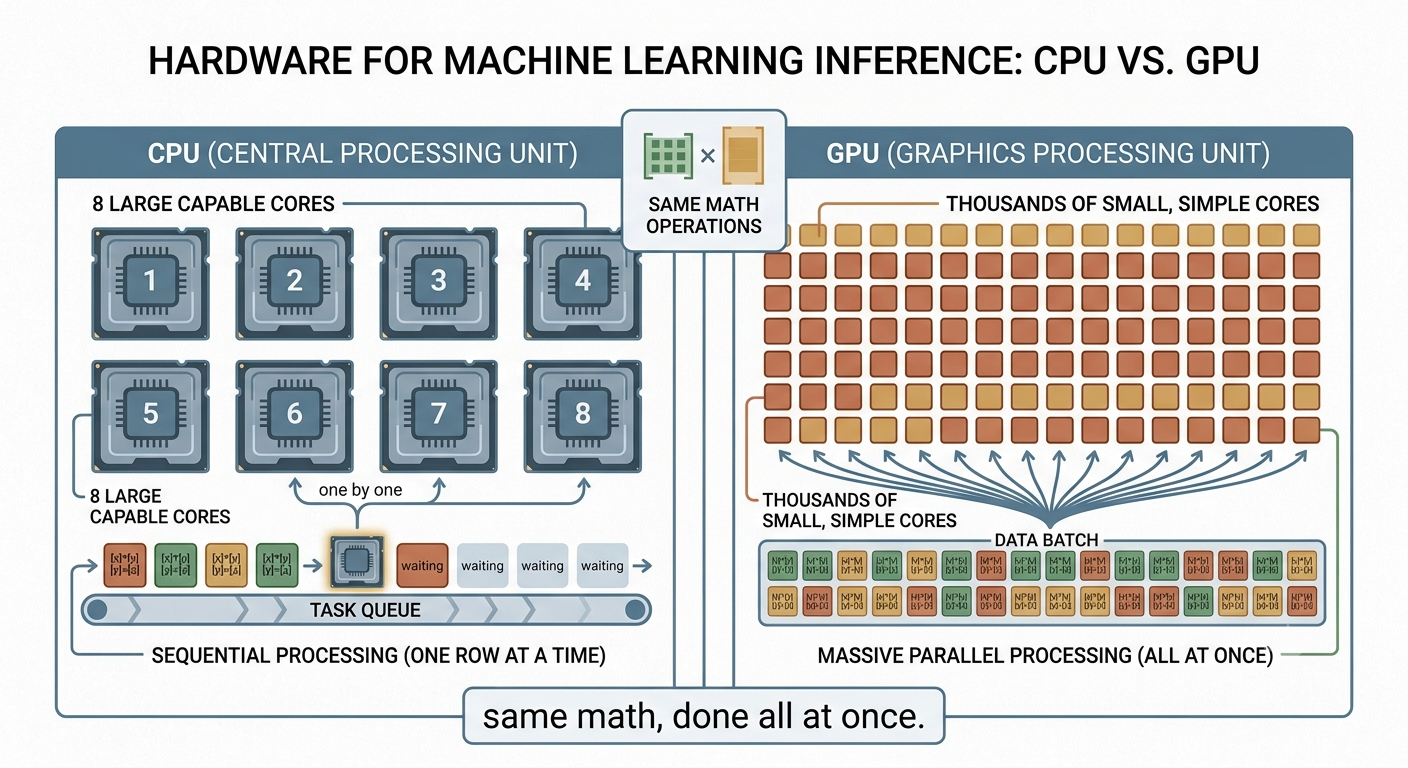
The result is not a small improvement, it is a different order of speed for this specific workload. Immich exposes exactly this in its hardware acceleration documentation, which lets the machine learning service run on CUDA, ROCm, or OpenVINO instead of the CPU. Community reports give a sense of scale. On CPU, smart search is consistently the slowest of the machine learning jobs, with users describing it as the bottleneck when indexing a large library. On modest GPU hardware, one write-up documents embedding roughly 300,000 photos in under a single night. Those are external figures from other people’s setups, not our own numbers, but the direction is consistent everywhere: the GPU clears the backlog in a fraction of the time.
The cards we chose for this are older consumer graphics cards rather than new datacenter accelerators. That is a deliberate choice, and it comes with tradeoffs worth naming. A card like that still has thousands of parallel cores and enough onboard memory to hold these models comfortably, which is all this workload needs. The models are not large by modern standards. CLIP is the heaviest of the three, while the face and OCR models are comparatively light. Reusing capable older hardware keeps good silicon in service instead of sending it to a shelf, and it keeps the whole pipeline on equipment we own outright.
There is a real cost on the other side of the ledger, and pretending otherwise would be dishonest. A GPU draws more power under load than an idle CPU, and running your own hardware means we carry the maintenance, the drivers, and the electricity. We think that is the right trade. Per photo processed, the GPU does the work at far better efficiency, and it means the AI that reads your memories runs on machines we control, under European law, rather than being shipped off to someone else’s cloud to be processed.
For now we run Immich’s default models, the same ones any Immich user gets out of the box. The reason this hardware step matters beyond speed is headroom. Bigger models generally need more compute and more memory to run at a usable pace, which is exactly what a CPU could not provide. With our own GPUs in place, running a larger CLIP variant for sharper search, or a heavier face model for better clustering, becomes a practical option rather than a non-starter. We are not making promises about specific models here. The point is that this step unlocks the door, and better results for our customers are the reason to walk through it.
There is a catch that comes with switching to a bigger model, and it is worth being upfront about it. A different model produces different vectors. The numbers that one CLIP model assigns to a photo mean nothing to another CLIP model, so you cannot mix old and new. If we ever move to a larger model, we would have to recompute the embeddings for every photo in every user’s Library from scratch, on our own GPUs. For a large user base that is an enormous amount of arithmetic, and it is precisely the kind of job that is hopeless on CPUs and merely a big job on GPUs. This step gets us closer to being ready for that, but we are not there yet. When we are, that will be worth its own blog post.
The point of doing it ourselves
None of these models are exotic, and none of them are secret. That is the nature of building on open source: you can read exactly what CLIP, buffalo_l, and PP-OCRv5 do, and so can we. The decision that actually shapes your privacy is not which model runs, it is where it runs and who operates it.
We run them on our own GPUs, in our own environment, on European soil. Your photos are read by machines we are responsible for, and the vectors and fingerprints that come out of that process stay with us and are never sold. That is the part Big Tech will not offer you, because for them the reading of your photos is the business model, not a feature.
To be clear about where we are, this is a first step, not the finished picture. The machine learning models now run on our own GPUs, but not our entire platform runs on hardware we own yet. Building out self-operated infrastructure is something we are doing piece by piece, and the AI that reads your photos was a deliberate place to start, because it is the most sensitive part. We would rather tell you exactly what runs where today than imply we are further along than we are. Expect us to expand on this in future posts as more of the stack moves onto our own hardware.
If you want a photo library with search this capable, without handing the underlying data to a company that monetizes it, that is what we are building.
A note on the images: the infographics in this post were generated with AI. We think they earn their place, making these ideas easier to picture.